raven_rf
Raven RF is a portable platform I built to understand radio frequency (RF) systems from the antenna up: the signals themselves, the processing behind them, and how raw radio activity becomes useful information on a screen.
It started with aircraft tracking. I wanted to understand what was happening beneath the software I was already using, from raw in-phase and quadrature (I/Q) samples to decoded messages and maintained tracks. That question grew into a self-contained Raspberry Pi platform for exploring aircraft, analog radio, satellites, Bluetooth, Wi-Fi, signal classification, and RF fingerprinting through a single interface.
Raven RF is designed for receive-side RF analysis and authorized testing of hardware and signals I am permitted to examine.
The attic feeder
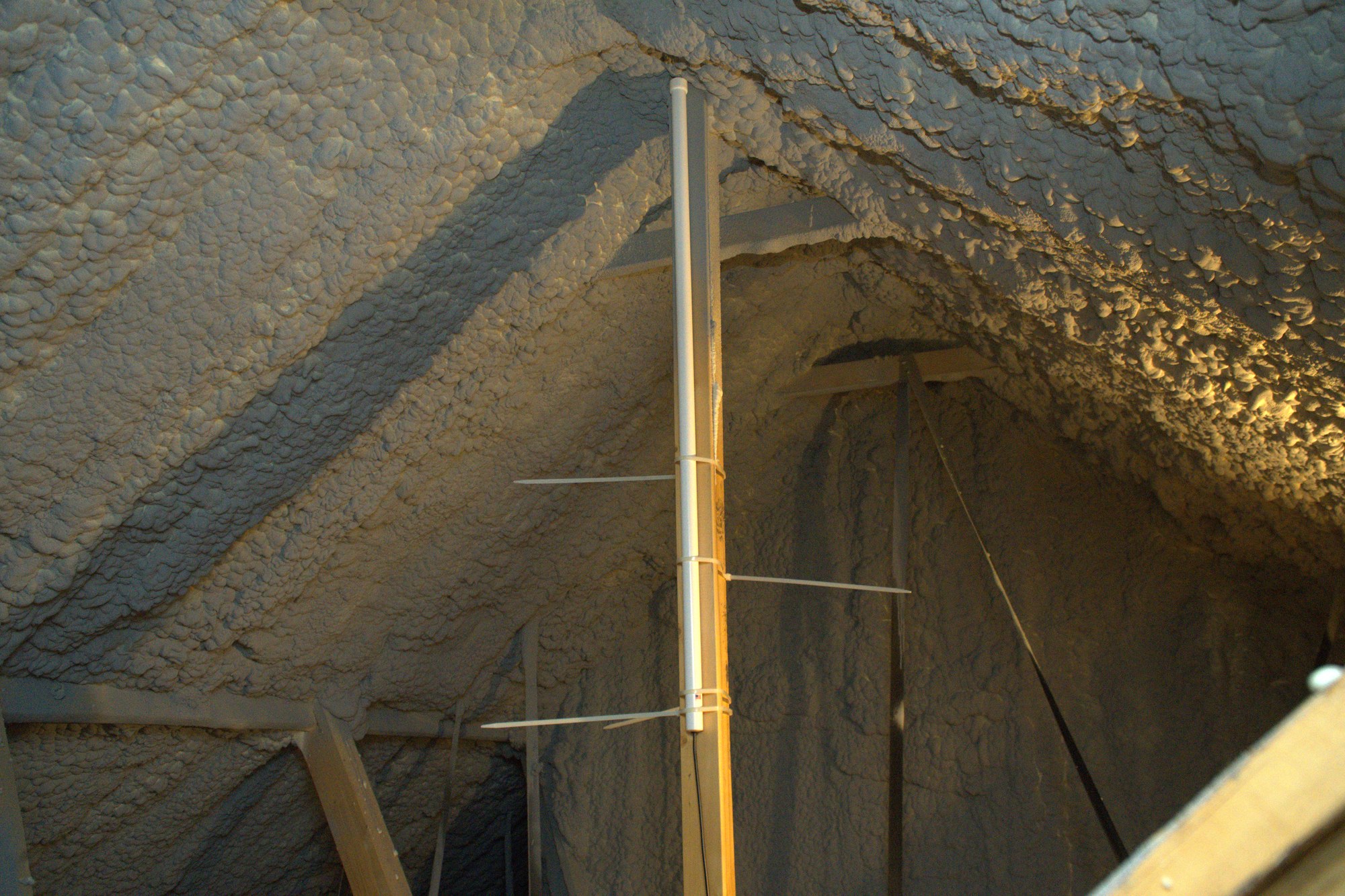
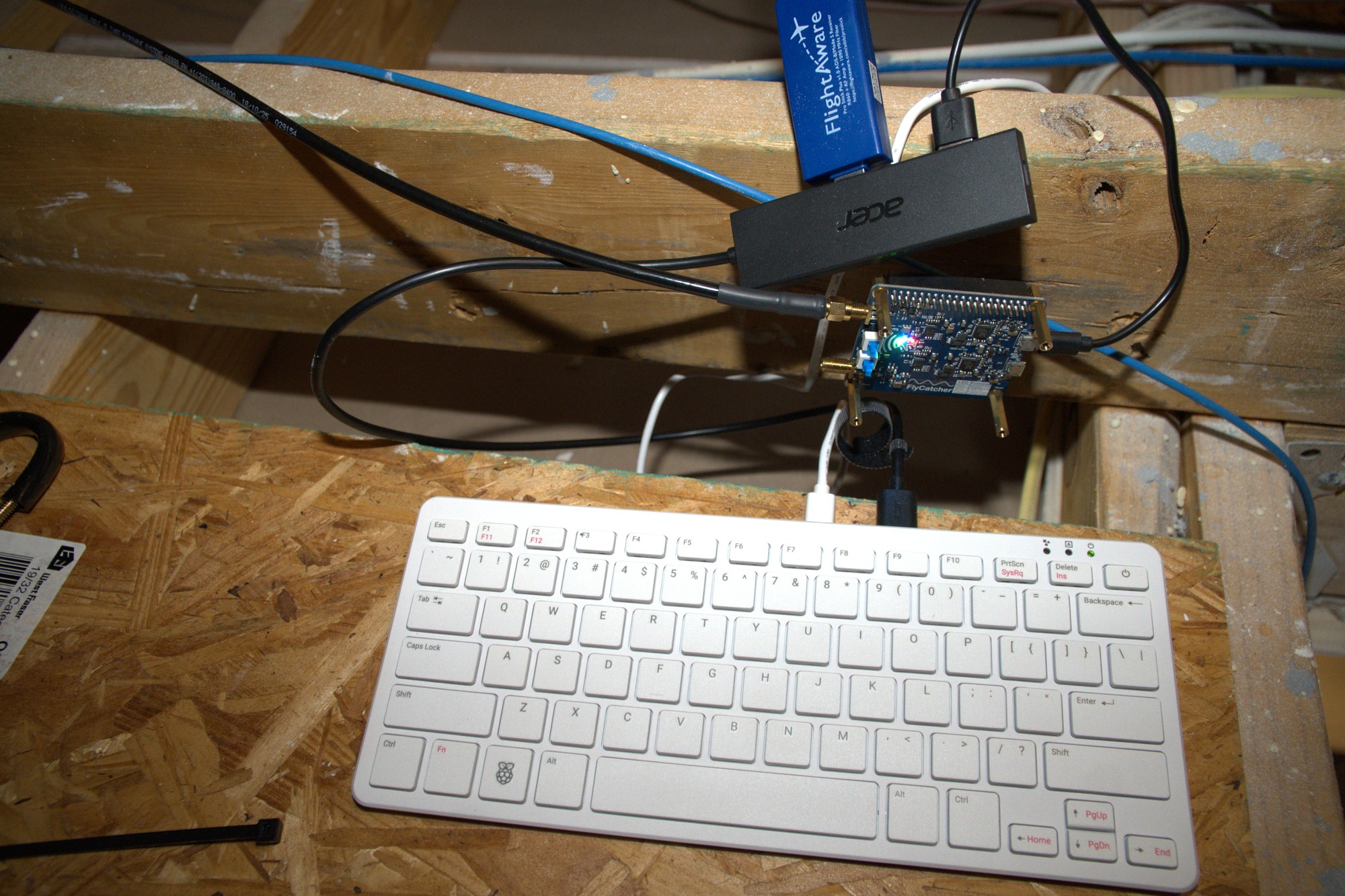
My first RF project was an aircraft feeder in the attic: two 9 dBi antennas, one for 1090 MHz and one for 978 MHz, each connected to its own software-defined radio (SDR) and both feeding a Raspberry Pi.
The feeder runs FlightAware's existing PiAware software stack, including dump1090-fa, dump978-fa, and fa-mlat-client. I assembled and configured the station; those tools handle aircraft decoding, the multilateration client, and reporting to FlightAware. Located between DFW International and Alliance, the station receives arrivals and departures from both airports along with high-altitude traffic farther away.
Seeing that coverage was exciting, but FlightAware's software was still doing the work of turning radio traffic into aircraft on a screen. I had assembled and configured the feeder, not written the decoding software behind it.
I could read the result, but I could not yet explain the complete path from the signal at the antenna to the bits in a Mode S message, from those bits to a position, and from successive positions to a moving aircraft track.
That became the question behind Raven RF.
From visualization to decoding
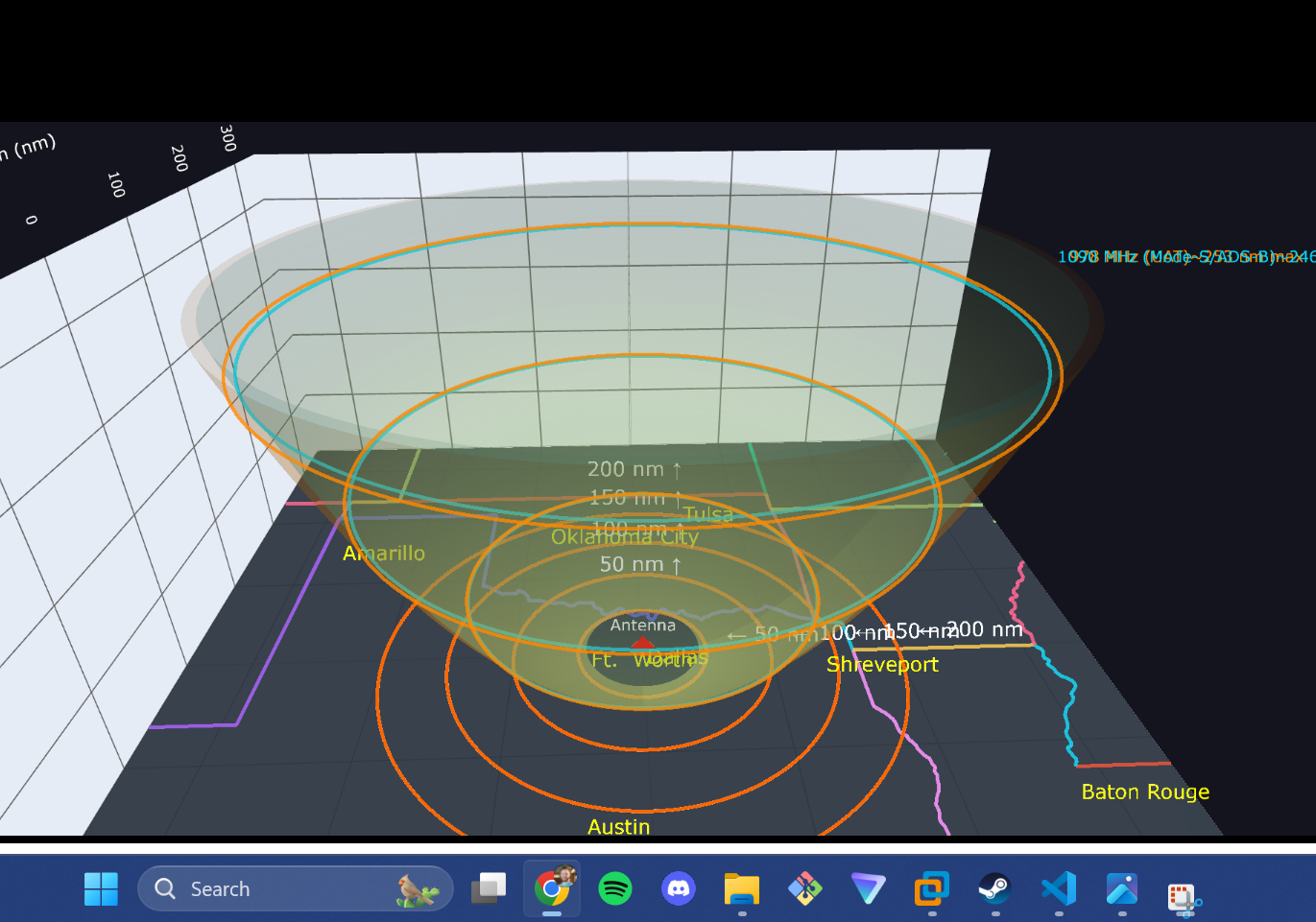
I first built a browser-based visualization to connect the antennas' gain and coverage patterns with the reception range I was measuring.
From there, I started an Unreal Engine 5 project to place those aircraft into a real 3D world while I learned more object-oriented programming. The longer-term idea was that an SDR user could connect a receiver and render their own local airspace.
A middleware application sat between the incoming aircraft data and Unreal Engine 5. It converted the aircraft messages into structured records and forwarded them to the visualization.
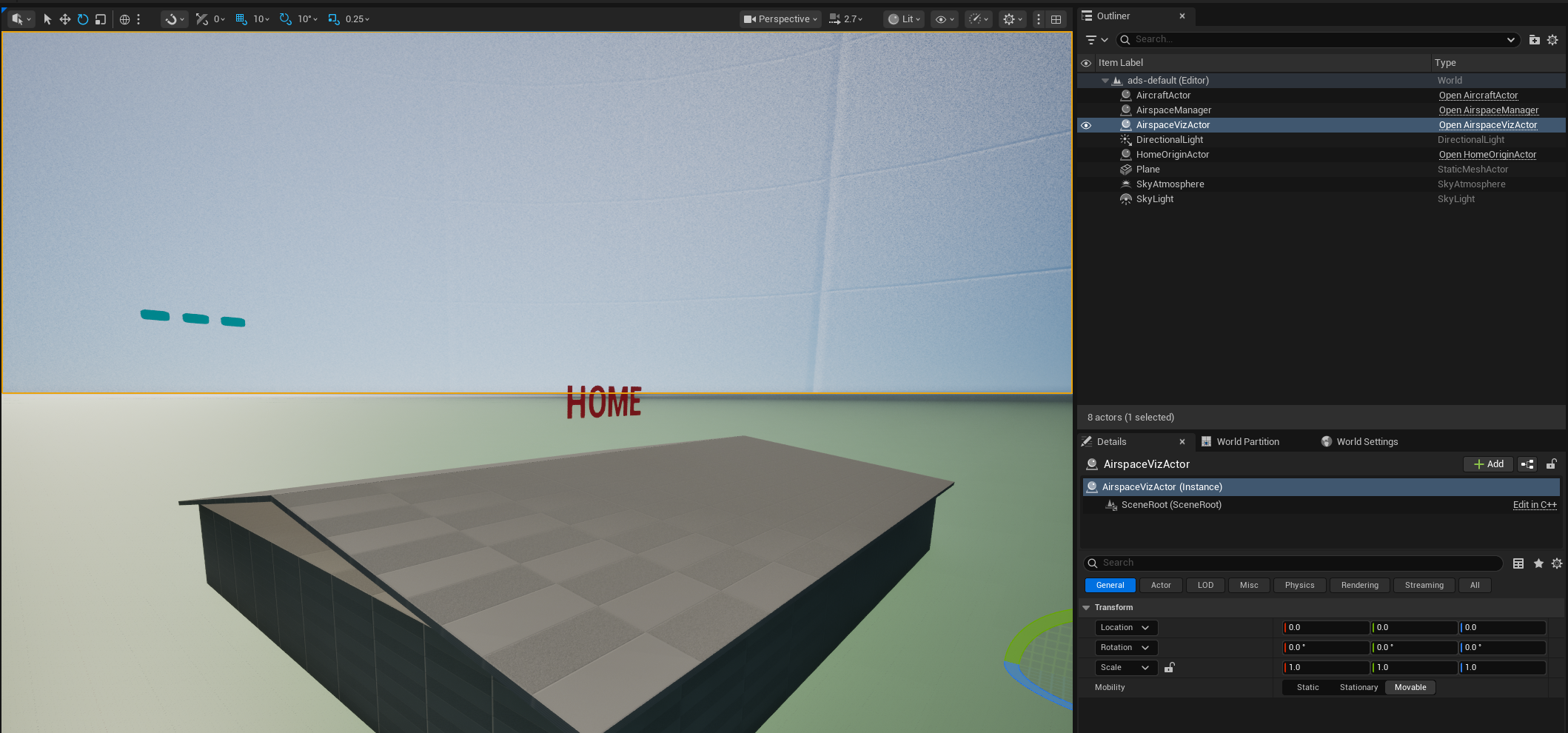
That pipeline helped me understand how to organize and display the aircraft data, but it made me increasingly interested in how the data was produced in the first place.
From idea to device
While building those aircraft projects, I was also participating in an Aero Cyber Range capture-the-flag competition and working through Hack The Box as part of my OSCP preparation. I was spending more time in Linux and seeing more cyberdeck-style projects built around small, self-contained computers.
I liked devices such as the ClockworkPi uConsole, Flipper Zero, PortaPack H2, and Hak5 WiFi Pineapple, but I wanted to build something around my own interests instead of buying another general-purpose device.
The goal became a portable platform with a heavier RF focus. It needed to be:
- self-contained
- battery powered
- usable without a network
- equipped with its own display
- capable of working with several radio and wireless systems through a single interface
Hardware
The resulting stack uses:
- HackRF Pro, the main SDR, covering 100 kHz to 6 GHz
- RTL-SDR V4 with a low-noise amplifier (LNA), dedicated to 978 MHz Universal Access Transceiver (UAT) reception
- nRF52840 radio, Bluetooth Low Energy (BLE)
- ALFA Wi-Fi adapter, 2.4 and 5 GHz Wi-Fi
- BU-353N5, GPS receiver
- Raspberry Pi 5, application computer with a 7-inch touchscreen
- Geekworm X1202 UPS HAT, battery power from four 18650 cells
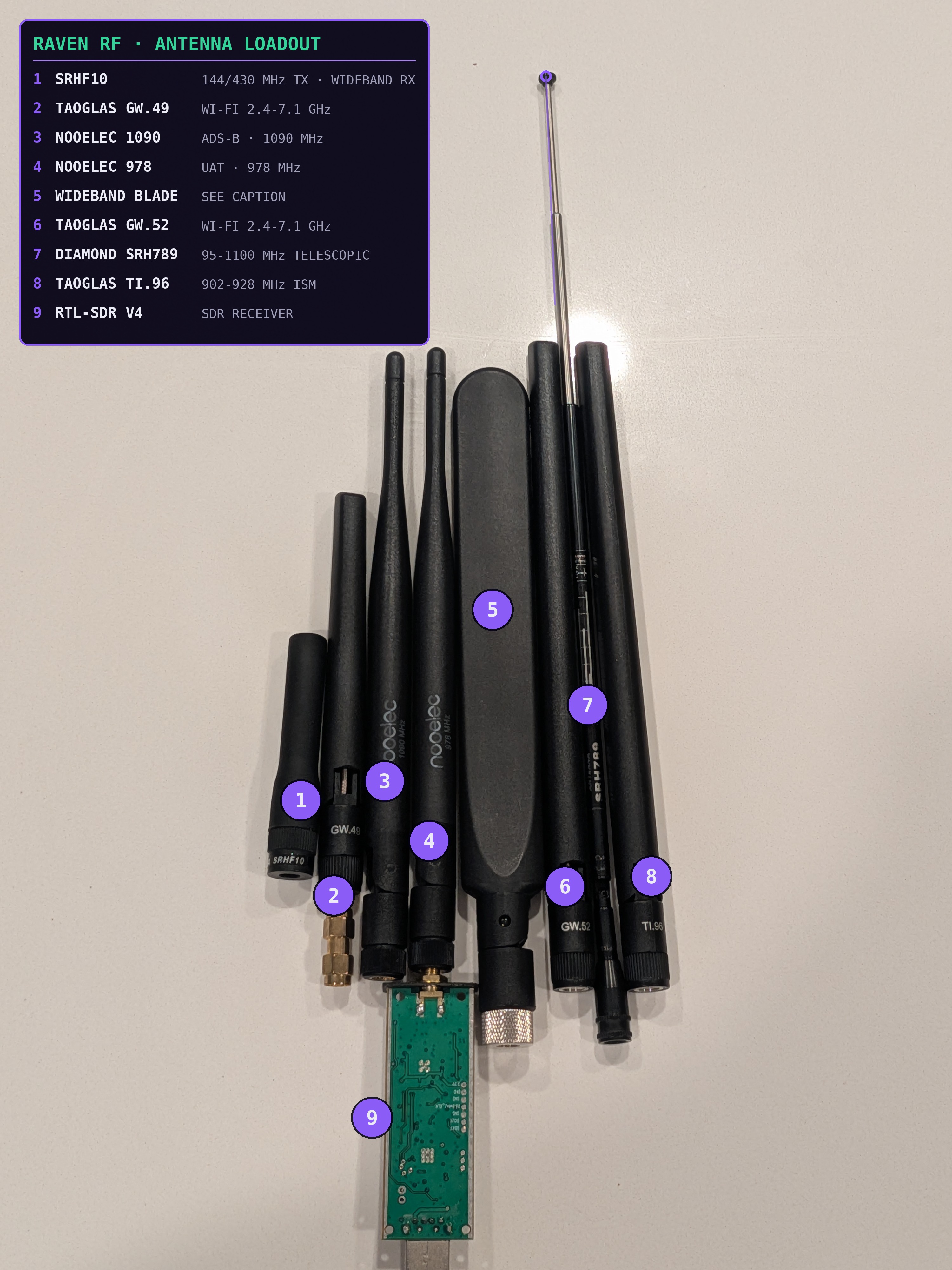
I also assembled antennas for the bands I wanted to explore: a 25 to 1300 MHz wideband whip, a VHF/UHF telescopic antenna for air and weather, a tuned 1090 MHz Automatic Dependent Surveillance-Broadcast (ADS-B) antenna, a 900 MHz ISM antenna, and several cellular whips.
Building the enclosure
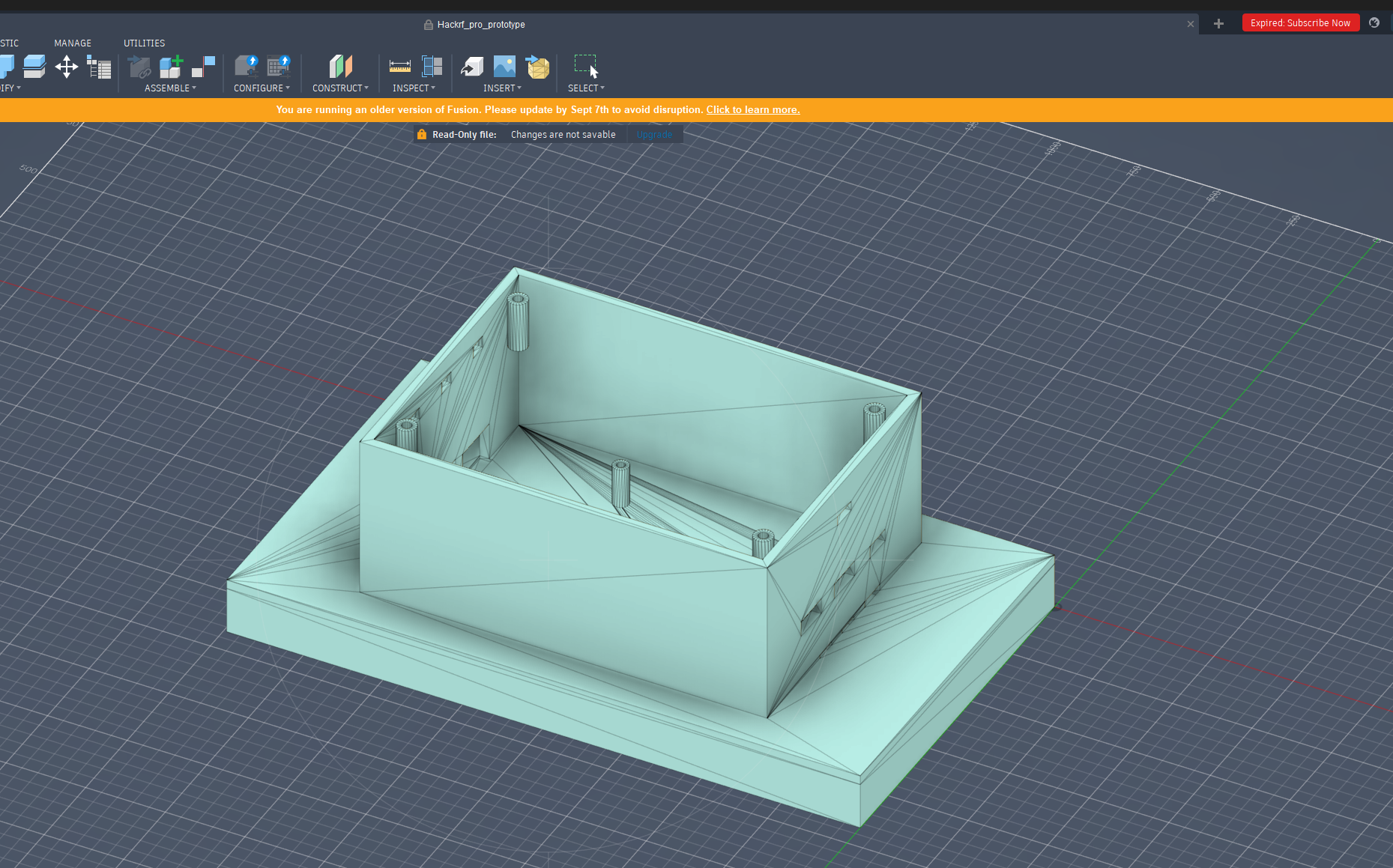
Because my access to the 3D printer was limited, I measured the entire hardware stack with calipers before designing the enclosure: the screen, Raspberry Pi, batteries, radios, cooling system, and cable clearances.
I used those dimensions to generate an initial OpenSCAD model with AI, then manually refined the design before exporting it for printing. The first full print was functional enough to become the current enclosure, although I may revisit the design as the hardware evolves.
Why Raven?
Before the main interface loads, a boot animation introduces the project's name and visual identity.
The name comes from Huginn and Muninn, the two ravens associated with Odin in Norse mythology. Their names are commonly translated as Thought and Memory. They are sent out into the world and return with what they have seen and heard.
That idea matched what I wanted the device to do. Raven RF uses sensors to observe an environment that is largely invisible, gathers their readings, and brings those observations into a single place where they can be interpreted.
The interface follows the same idea: a dark tactical HUD, Raven-purple accents, monospaced readouts, and a live map used as the common operating picture.
Engineering the platform
Building individual RF tools was only one part of the problem. As Raven RF grew, the larger challenge became allowing those tools to share hardware and data without interfering with one another.
One radio, many capabilities
The HackRF is a half-duplex SDR with one RF chain and one antenna port. It can receive or transmit, but not both simultaneously, and it produces only one tuned I/Q stream at a time.
That creates an immediate constraint. Several components can analyze signals contained within the same captured bandwidth, but capabilities such as 1090 MHz Airspace, satellite reception, VHF radio, and sub-GHz analysis cannot independently tune the same HackRF to different frequencies at the same time.
The 978 MHz UAT path avoids that conflict by using the RTL-SDR independently.
Early versions of Raven RF let individual tabs control the HackRF directly. As more capabilities were added, two parts of the application could try to configure the same radio at once, causing hangs. I replaced that arrangement with a central SDR arbitrator. Every subsystem must request ownership before it can configure or start the HackRF. The owner controls settings such as center frequency and sample rate until it releases the radio.
The limitation did not disappear. Instead, Raven RF's architecture now represents it directly.
Decoupling the software
A second scaling problem appeared as workers, decoders, trackers, classifiers, and views accumulated: every new feature needed direct connections to more existing components. Small changes began to ripple across unrelated parts of the application.
I replaced that point-to-point mesh with a publish/subscribe DataBus. Producers publish named events such as decoded frames, aircraft updates, and signal classifications. Consumers subscribe only to the events they need. Hardware workers no longer update the interface directly, and views do not reach into worker implementations.
The DataBus reduced coupling, but it did not solve CPU contention. The aircraft decoder and radar renderer originally ran in separate Python threads. Architecturally they were separate, but CPU-bound Python code still had to contend with the global interpreter lock. The decoder could hold the interpreter long enough to starve the radar renderer.
The aircraft decoder now runs in a separate process and returns its results through a multiprocessing queue. Resources tied to a particular thread remain with the worker that created them, while inactive views pause their refresh timers.
Together, those boundaries let the application grow without every subsystem directly depending on every other one.
The common operating picture
The home screen is Raven RF's base view rather than another tab. It combines information from across the system into one persistent picture:
- offline map
- aircraft tracks
- Wi-Fi and BLE detections
- Radio Intercept status
- GPS position
- upcoming satellite passes
- Signal AI results
- RF fingerprint alerts
- hardware state
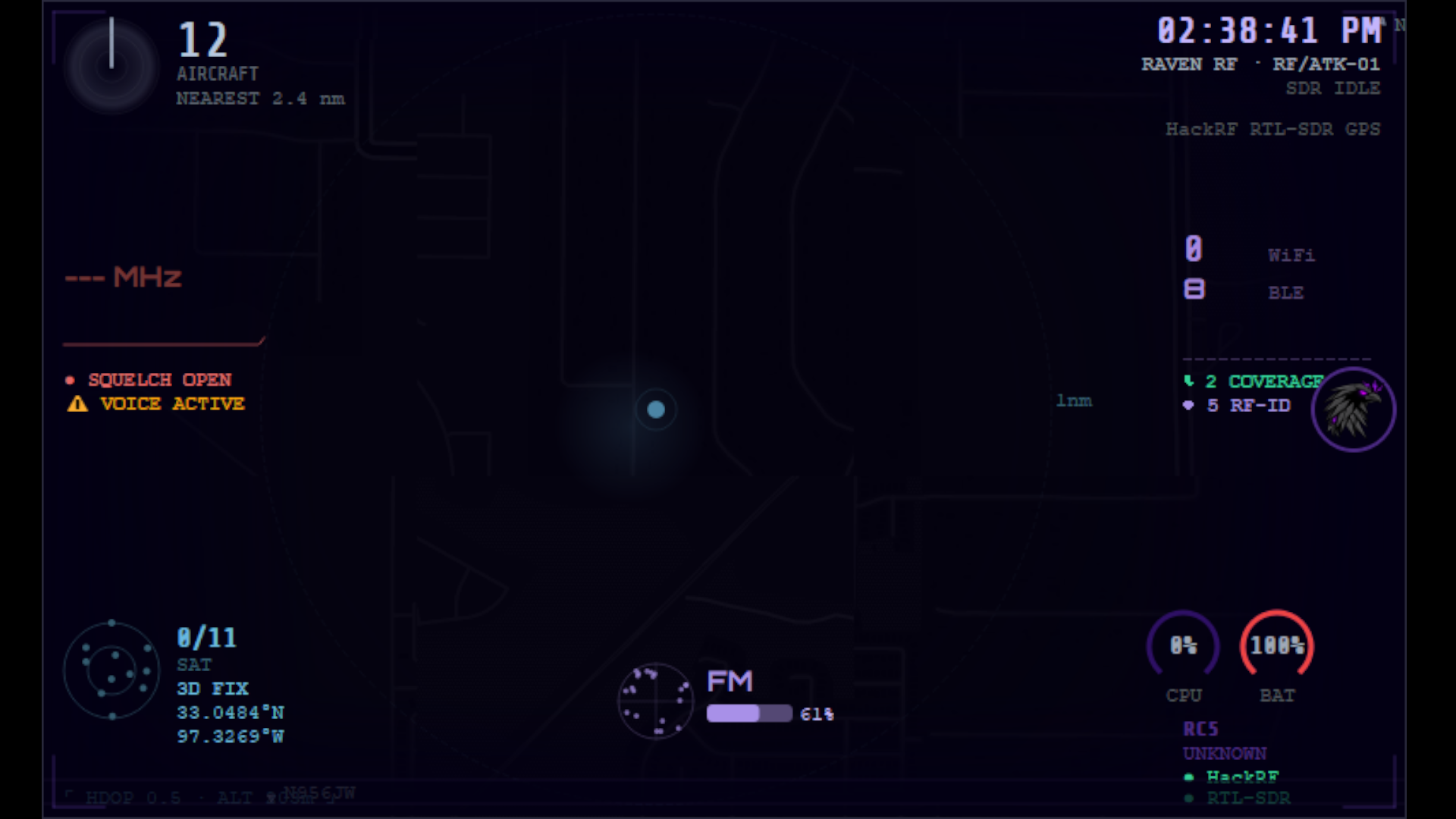
When another capability opens, the map remains underneath it. Closing that view returns directly to the common operating picture.
The Android Team Awareness Kit (ATAK) was the primary design influence: the map acts as the anchor while different sources contribute tracks, icons, layers, status, and context.
A broader version of the same idea appears in the open-source intelligence (OSINT) globe, where external data sources share a geographic view. The next step is to combine more of Raven RF's locally detected activity with that wider context.
Runtime health
The System tab shows Raven RF watching itself while it runs. It displays live CPU, memory, temperature, UPS battery state, SDR state, peripheral state, and active subsystems.
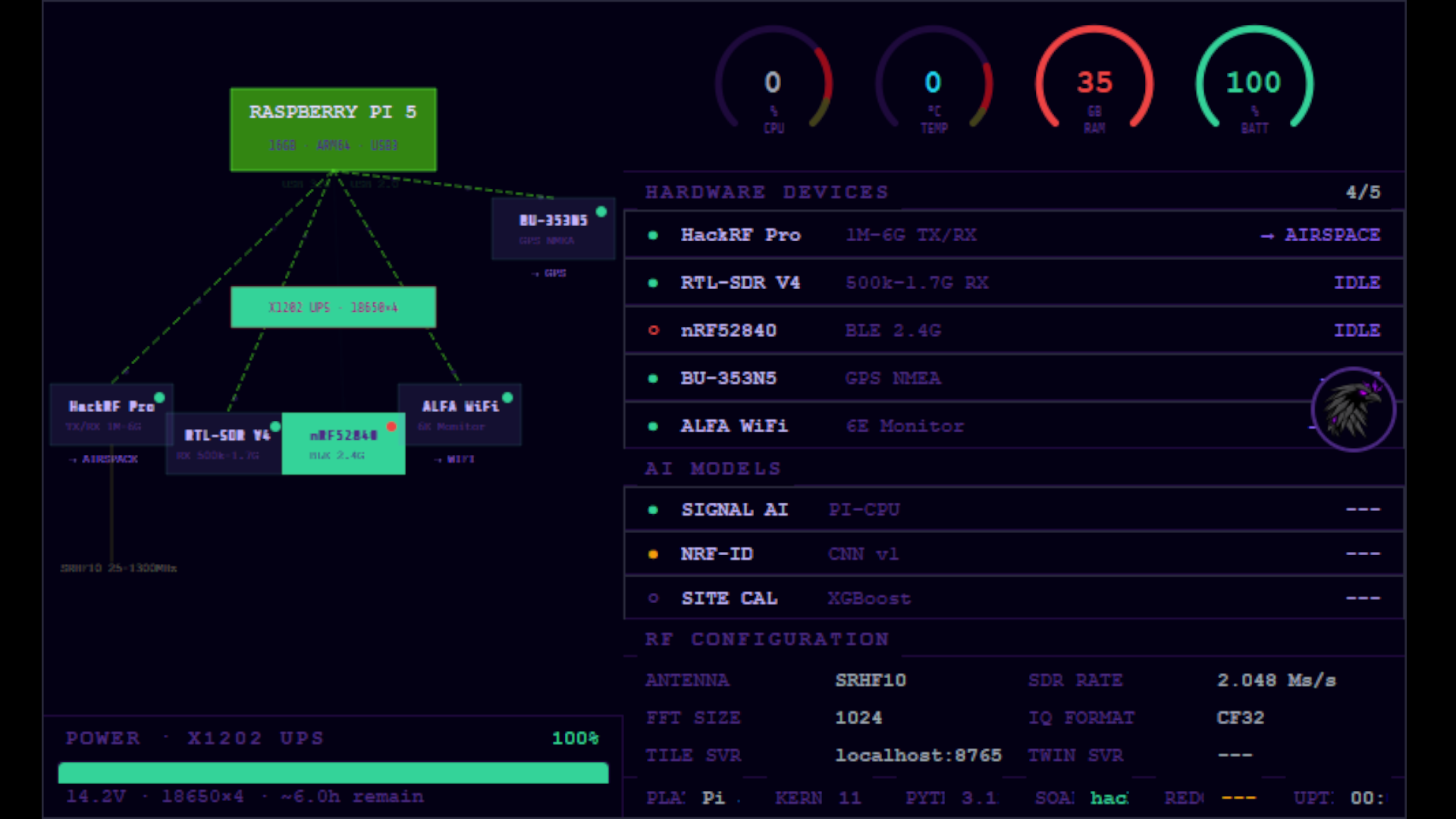
Because the platform is battery powered and several hardware devices share one Raspberry Pi, resource health is part of the instrument rather than something hidden behind the interface.
The System tab shows whether Raven RF remains healthy after startup. Preflight, described later, determines whether it was healthy enough to start in the first place.
Airspace
Airspace is the most developed part of Raven RF and the capability that most directly follows the question that started the project. The goal is not simply to display aircraft. It is to follow the processing chain from the radio signal itself to decoded messages, reconstructed positions, maintained tracks, and predicted motion.
Raven RF processes both 1090 MHz Mode S / ADS-B and 978 MHz UAT. The 1090 MHz path uses the HackRF. The 978 MHz path runs independently on the RTL-SDR, allowing Raven RF to process both aircraft bands at the same time instead of continually retuning one receiver.
Building the 1090 MHz decoder
At first, I used existing Mode S decoders while I built the surrounding system. Once that pipeline was working, I replaced that layer with my own decoder so I could understand and control the complete path from raw I/Q samples to aircraft messages. Raven RF's current 1090 MHz receiver begins with raw samples rather than decoded aircraft data. It:
- calculates the signal magnitude
- detects the fixed Mode S preamble
- recovers the pulse-position-modulated bits
- verifies the recovered message
- parses its fields
Message integrity
Once a frame is recovered, Raven RF calculates its 24-bit cyclic redundancy check (CRC). I also implemented single-bit error correction. A precomputed syndrome table maps a CRC error pattern to a possible corrupted bit. Raven RF flips that candidate bit and calculates the CRC again. The repaired frame is accepted only if it validates afterward. Frames that still fail are discarded.
Field decoding
I also wrote the field decoder directly in Python instead of calling the pyModeS library. Depending on the message type, it extracts the aircraft's 24-bit ICAO address, flight identification or callsign, altitude, velocity, and Compact Position Reporting (CPR) data. As a result, Raven RF's active 1090 MHz path no longer relies on an external aircraft-decoding library.
978 MHz UAT
UAT required a separate implementation because the modulation and framing are different. Where Mode S represents bits through pulse position, UAT uses frequency changes. Raven RF derives those changes from the phase relationship between consecutive I/Q samples, recovers the symbols, and searches for the 36-bit synchronization word that identifies a frame.
The most substantial part of this decoder is its Reed-Solomon forward error correction. Reed-Solomon correction uses redundant symbols in the transmission to reconstruct data damaged in transit. I implemented the decoder from the finite-field arithmetic upward over GF(2^8). The decoding path uses Berlekamp-Massey to derive the error-locator polynomial, Chien search to locate corrupted symbols, and Forney's algorithm to calculate the required corrections. Short UAT frames use RS(30,18) and can repair up to 6 corrupted symbols. Long frames use RS(48,34) and can repair up to 7. A CRC-16 is checked after Reed-Solomon processing.
From messages to positions
Receiving a valid ADS-B frame still does not necessarily provide a directly usable latitude and longitude. ADS-B encodes positions with CPR. Raven RF supports two methods of resolving those positions. A position can be reconstructed locally using the receiver's known location as a reference, or a recent even and odd CPR frame from the same aircraft can be paired to derive a globally unambiguous position. Once resolved, those measurements become input to the tracking system.
From positions to tracks
Plotting every reported coordinate independently would leave the display vulnerable to noise, inconsistent measurements, and abrupt motion. Instead, Raven RF maintains a state estimate for each aircraft with an Interacting Multiple Model (IMM) tracker. Three motion models operate together:
- constant velocity, steady flight
- constant acceleration, changes in speed
- coordinated turn, maneuvering flight
On each update, the tracker compares the newest measurement against the prediction made by each model and changes their weights according to how well each one explains the aircraft's current behavior.
The tracker also gates measurements that are too inconsistent with the predicted state. Rather than allowing one implausible observation to pull a track across the map, Raven RF performs a prediction-only update and waits for another measurement. After three consecutive rejected measurements, the track reinitializes at the new position instead of continuing to preserve stale state.
From the current estimate, Raven RF projects the aircraft 60 seconds forward in 5-second increments. When the coordinated-turn model carries the strongest weight, the projected path can curve with the maneuver.
One aircraft picture
Local 1090 MHz reports, local 978 MHz UAT reports, and an optional network aircraft source can all contribute to the displayed picture. That network source is the attic feeder from chapter 00. Selecting NET supplements the portable receivers with the feeder's attic antennas, bringing hundreds of additional aircraft into the same picture the handheld builds on its own. Reports are associated using the ICAO address. Raven RF uses a fixed source precedence rather than mixing individual fields from different records. The resulting state feeds several Airspace views, each exposing a different part of the pipeline.
RADAR
RADAR is the tactical view of the complete Airspace system. It displays traffic around the receiver with range rings, aircraft colored by source, smoothed trails, current motion-model state, predicted flight paths, uncertainty information, and conflict overlays.
The important difference from a simple aircraft plot is that RADAR displays the maintained estimate produced by the tracking system rather than treating every received position as an isolated point.
ACTIVITY
ACTIVITY presents the same live traffic as a searchable aircraft roster. Aircraft can be inspected and grouped into categories such as military, government, medical, and civilian traffic.
RADAR answers where the traffic is. ACTIVITY makes the population itself easier to explore.
SIGNALS
SIGNALS exposes the RF and message-processing side of the Airspace pipeline. For a selected aircraft, Raven RF can show captured signal data alongside its decoded Mode S messages. The message table exposes the hexadecimal frame, decoded fields, and integrity state.
The same tab also has a view for messages that arrive without captured I/Q, such as those added from the attic feeder. Instead of the envelope, it presents the decoded fields directly, including message type, aircraft address, category information, position-quality data, and integrity status.
This view keeps the intermediate data visible, making it possible to work backward from an aircraft displayed elsewhere in Raven RF toward the radio traffic that produced it.
TRACKS
TRACKS follows one ICAO address over time. It combines altitude, speed, heading, signal strength, position history, and the recent message timeline.
Where RADAR shows the whole airspace, TRACKS makes it easier to inspect how the system maintains the state of one aircraft through successive observations.
RAW
RAW is the closest Airspace view to the decoder output. Mode S frames appear as they are received with timestamp, downlink format, ICAO address, type code, raw hexadecimal bytes, and integrity state.
The higher-level views deliberately turn radio traffic into something easier to understand. RAW does the opposite. It leaves the received messages close to their decoded form so the aircraft picture can be traced back to the live RF traffic beneath it.
Expanding across the spectrum
Airspace is the deepest implementation, but Raven RF was designed so additional sensing capabilities can use the same platform and contribute to the same overall picture.
Radio Intercept
CurrentRadio Intercept is the analog-voice receiver pipeline I wrote. It covers civilian air traffic control, FM, NOAA weather radio, and the 225 to 400 MHz military UHF aviation band.
The receiver intentionally tunes slightly away from the selected center frequency to avoid the HackRF's central DC artifact. It then isolates the monitored channel from the wider I/Q capture before demodulating the AM or FM audio. The squelch measures power inside that channel rather than across the entire captured bandwidth, so unrelated activity elsewhere in the sample does not open the audio.
Project 25 (P25) is the next major step for monitoring unencrypted public-safety traffic. Railroad radio monitoring is another planned addition because an active freight line runs nearby.
Satellite
The Satellite tab serves two roles.
External context
The OSINT globe is a Cesium-based world view. It continuously pulls live data from external APIs and combines the results geographically. Satellites are plotted from two-line element (TLE) orbital data, and selecting one displays its orbit. The globe also combines external hazard and activity feeds with aircraft and satellite data, making their geographic relationships visible on the same map. A selected point can also display the satellites currently closest to it.
Receiving overhead
The second part of the tab uses Raven RF's own radio hardware. It predicts NOAA weather-satellite passes using SGP4, schedules capture when a satellite is in range, and displays a live waterfall while the downlink is received. The Automatic Picture Transmission (APT) signal is then decoded line by line into a weather image.
This turns a live 137 MHz satellite downlink into a weather image covering the region around the receiver.
Bluetooth
CurrentThe Bluetooth tab maps nearby BLE activity across the 2.402 to 2.480 GHz portion of the 2.4 GHz ISM band. Bluetooth operates independently of the HackRF. Devices can be discovered through the computer's normal Bluetooth controller or, when connected, through an nRF52840 running Nordic sniffer firmware that captures advertising packets directly over the air.
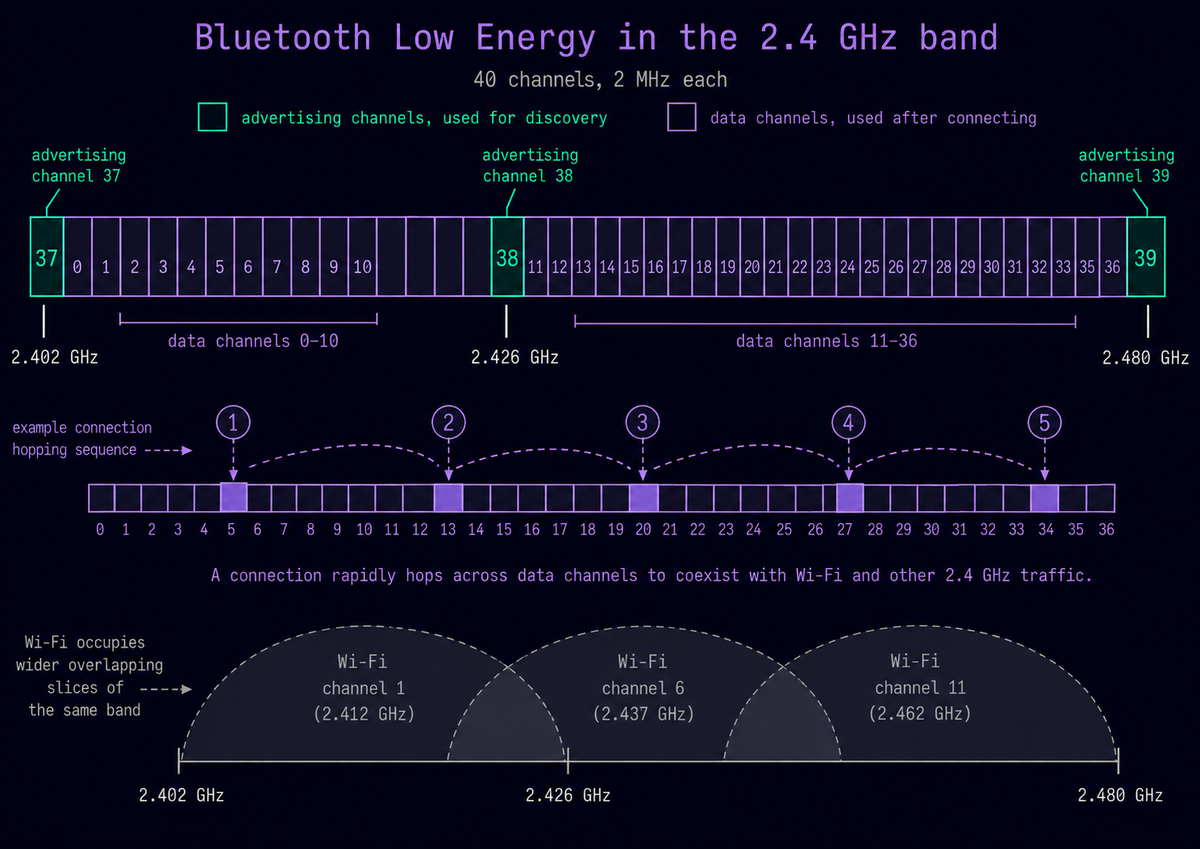
I wrote an advertisement parser that converts raw BLE fields into structured device information, including device name, address, address type, advertised services, manufacturer data, and vendor information. The parser uses Bluetooth SIG identifier tables to map known codes to vendor and service names.
Raven RF also identifies resolvable private addresses, or RPAs, which rotate periodically instead of behaving like permanent device addresses. The parser can recognize selected information from common Bluetooth ecosystems and manufacturer-specific advertisements. Because some proprietary formats are undocumented or change across software versions, Raven RF treats those interpretations as best-effort rather than guaranteed protocol definitions.
Devices can be grouped into categories such as phones, wearables, IoT hardware, and trackers using several pieces of advertisement data rather than the name alone. Recognized tracker-like devices, including AirTag / Find My accessories, Tile devices, and Samsung SmartTags, can be surfaced to the home screen.
Proximity
Raven RF also tracks each device's received signal strength indicator (RSSI) over time. A Kalman filter smooths the signal measurements so short fluctuations do not dominate the trend. The resulting movement state can be reported as approaching, receding, or steady. When a device advertises calibrated transmit power, Raven RF can combine it with RSSI to estimate rough distance. Otherwise it uses a general signal-falloff estimate.
These are proximity estimates, not coordinates. A single antenna provides no direction information, and walls, reflections, people, orientation, and other environmental factors can significantly change RSSI.
Authorized active testing
For devices I own or have explicit permission to test, Raven RF can move from passive observation to controlled interaction. The tab's active assessment layer can enumerate Generic Attribute Profile (GATT) services and characteristics, inspect captured connection and pairing behavior, exercise writable characteristics with controlled fuzzing, and perform lower-level controller testing through the Linux host controller interface (HCI). These functions require an explicitly selected target and are intended for authorized testing of my own hardware.
NextTwo planned directions are to move proximity state onto the main HUD map and to use captured BLE signal data as real input for NRF-ID fingerprinting experiments.
Wi-Fi
CurrentThe Wi-Fi tab maps nearby 802.11 networks across the 2.4 and 5 GHz bands. It uses a dedicated external ALFA Wi-Fi adapter through Linux wireless tools, so Wi-Fi scanning operates independently of the HackRF. A background scanner records SSID, BSSID, channel, signal strength, and security type. Networks age out after they are no longer observed. The same data drives a channel display showing where identified networks are operating and how strongly they are received.
That visualization is intentionally different from a spectrum analyzer. A fast Fourier transform (FFT) displays the frequency content of raw samples regardless of whether Raven RF understands the signal. The Wi-Fi view displays only networks the scanner has identified and places them on their corresponding channels. It is therefore a view of the Wi-Fi environment rather than the complete RF energy in the band.
NextThis is an area I want to develop much further. The next step is to study 802.11 at a lower level by capturing and inspecting packets, examining management and authentication frames, following device-association behavior, and working more directly with Linux networking tools.
Experimental intelligence
Two parts of Raven RF explore whether the system can extract information about a transmission beyond decoding a known protocol. They approach that question from different directions.
Signal AI asks: what kind of signal is this?
NRF-ID asks: does this physical transmitter resemble one I have seen before?
Neither result should be treated as proof on its own.
Signal AI
Current experimentSignal AI takes short windows of raw I/Q samples and attempts to classify the signal's modulation. The current PyTorch model combines a convolutional encoder with a small Transformer. The model classifies signals across 13 modulation types while also estimating properties such as signal-to-noise ratio and frequency offset.
Inference runs locally on the Raspberry Pi. The current model reaches approximately 46% accuracy across 13 classes on synthetic test data, compared with roughly 8% for random guessing. That result is limited to the current synthetic evaluation and is not presented as equivalent performance on real RF captures.
The architecture I am working toward keeps the Raspberry Pi focused on RF capture and deployed inference while moving training and retraining to a connected RTX 3090 workstation. The next major step is to train under more realistic RF conditions, incorporate labeled over-the-air captures, and measure how well a model trained on synthetic data transfers to real signals.
NRF-ID
Current experimentNRF-ID is Raven RF's RF-fingerprinting workspace. It looks for small, repeatable differences associated with transmitter hardware using I/Q samples already captured by Raven RF's receive paths. Current measurements include characteristics such as carrier-frequency offset, I/Q imbalance, turn-on behavior, and nonlinear distortion.
Multiple captures can be enrolled into a persistent reference profile. Future transmissions can then be compared with that profile and reported as consistent with the reference profile, inconsistent with it, or unknown.
The central challenge is separating the transmitter's characteristics from the environment and receiver. Signal strength, multipath, receiver gain, temperature, orientation, and the receiving hardware itself can all affect the measurements. A fingerprint from one recording is therefore not enough. The experiment becomes more meaningful only if the same transmitter remains distinguishable across different captures, days, and RF conditions.
NextThe next step is to train an embedding model directly from captured I/Q bursts so signals from the same device can cluster together in a learned fingerprint space. Longer term, NRF-ID could provide an additional consistency check for systems such as Airspace or Bluetooth. The intended result would not prove that a claimed ICAO address or Bluetooth identity is authentic. It would provide another piece of evidence about whether the physical transmission resembles one Raven RF has previously observed.
Preflight
A working interface does not necessarily mean the system behind it is working correctly. Raven RF's Preflight sequence exists for that reason.
Before the main interface opens, Raven RF validates the environment, dependencies, connected hardware, SDR interfaces, and software layers required for startup. Checks report one of three states:
- PASS: operating as expected
- WARN: optional capability missing or degraded
- FAIL: required functionality is broken
The exact number of tests depends on the connected hardware, but a fully configured system runs more than 300 checks. These checks go beyond detecting whether a USB device exists. Preflight exercises the layers Raven RF is actually about to use so that a successful launch represents a functioning system rather than one that simply appears alive.
Preflight also became useful during development. Several difficult problems became easier to isolate once Raven RF could test hardware, interfaces, queues, and subsystem contracts before the UI became involved. In that sense, Preflight serves two purposes:
- Readiness: can Raven RF start correctly?
- Diagnosis: if it cannot, where is the failure?
The System tab then continues that idea after startup by monitoring whether the platform remains healthy while it runs.
What fought back
Some of the most useful parts of Raven RF came from failures rather than planned features. Three bugs in particular changed how I approached the system.
- Symptom
- The aircraft decoder and radar renderer were placed on different threads, but the renderer could still be starved.
- Cause
- Separating the code into threads did not make CPU-bound Python execute in parallel. The decoder could hold the global interpreter lock long enough to keep the radar from receiving enough execution time.
- Fix
- I moved the aircraft decoding loop into a separate process and returned its output through a multiprocessing queue.
- What changed
- I made process boundaries an explicit part of the architecture instead of assuming threads would provide sufficient isolation.
- Symptom
- The application continued running and appeared successful, but expected SQLite writes were not actually being stored.
- Cause
- A SQLite connection created on one thread was being used from another.
- Fix
- I changed the database code so each SQLite connection is created and used by the same worker thread.
- What changed
- A failure that remains hidden can be more difficult than one that crashes visibly. I added more instrumentation and validation so broken internal state would be exposed instead of remaining silent.
- Symptom
- The VHF receiver produced mostly static instead of intelligible audio.
- Cause
- It was operating on the full wideband capture instead of first isolating the voice channel.
- Fix
- I moved channel filtering and decimation earlier in the receive chain, before demodulation.
- What changed
- I began treating each intermediate DSP stage as something to inspect and validate rather than treating the entire receive chain as one opaque operation.
The common lesson across all three was the same: a system can appear to be working while an internal subsystem is failing. That is why Raven RF now includes mechanisms such as Preflight, queue counters, intermediate signal checks, and clearer ownership boundaries.
Where it goes next
The next stage of Raven RF is less about adding more tabs and more about deepening the capabilities already present and connecting them more closely.
Signal AI needs to move beyond synthetic training data toward labeled over-the-air captures, with training and retraining moving to a connected RTX 3090 workstation while the Raspberry Pi remains focused on capture and inference.
NRF-ID needs a much larger dataset collected across different days and RF conditions before I can evaluate whether transmitter fingerprints remain consistent enough for a learned embedding model.
Wi-Fi analysis can expand into packet-level 802.11 inspection, while cellular analysis can eventually provide another view of the surrounding radio environment.
The larger direction is the home screen. I want Raven RF to build a unified live picture from aircraft, satellites, Bluetooth, Wi-Fi, detected signals, RF fingerprints, and outside sources while leaving the individual tabs available for deeper analysis.
Raven RF started with one question: how does a radio signal reaching an antenna become meaningful information on a screen? It has grown into a platform I can keep using to answer that question across RF, signal processing, networking, tracking, software architecture, and machine learning.
AI has helped me move faster across a project this broad, but it does not replace verification or understanding. Every capability still has to pass the same test: I need to be able to verify what it does and explain why it works.
Raven RF is not intended to be finished. The point is to have one platform that can continue growing with my understanding of the wireless environment.